👉 Microsegmentation has become one of the core strategies for reducing lateral movement and tightening cloud security posture in Azure. While enterprises often reach for full-blown firewalls or SASE products, the humble Network Security Group (NSG) remains one of the most powerful — and misunderstood — native tools for enforcing segmentation at scale.
This post breaks down how NSGs actually behave in microsegmented environments, the operational pain points teams run into, how to avoid common mistakes with default rule sets and blast radius.
👓 Why NSGs Still Matter for Microsegmentation
NSGs operate at Layer 3/4 and are enforced directly in the Azure Virtual Network fabric. They’re fast, low-latency, cost-free, and tightly integrated with Azure networking — which makes them ideal for:
East–west network segmentation
Limiting which workloads can talk to each other inside a VNet or across peered VNets or Subnets.
Subnetwork-level & NIC-level isolation
Placing NSGs on subnets gives shared baselines; attaching them to NICs gives surgical controls for high-sensitivity workloads — (always think about to put it only in subnet level, but there will be cases where you will need to in NIC).
The Pros: What NSGs Do Well
✔ Native, simple, and cost-efficient
NSGs come with the platform. No appliances, no licensing, no throughput limits.
✔ Deterministic rule processing
NSGs evaluate rules in priority order — lowest number wins. Easy to reason about, assuming rule sets are kept clean.
✔ Seamless integration with Azure constructs
Service Tags, ASGs, VNets, and Load Balancer health probes all work consistently. NSGs feel “built-in” because they are.
The Cons: Where It Gets Hard (Fast)
❌ Rule sprawl
As environments grow, NSGs multiply. One environment with 20 microservices can easily have:
20+ NSGs
Hundreds of rules
Multiple teams editing them
Without governance, they become unmanageable.
❌ Shadowing & rule-order conflicts
One incorrectly ordered deny rule can override the rest of the policy and block production traffic. Debugging this is painful.
❌ No Layer 7 awareness
NSGs cannot inspect payloads, URLs, user identity, TLS, or application behaviour.
If you need next-gen firewall capabilities, you’ll need Azure Firewall or an NVA.
👁️🗨️ Blast Radius: The Hidden Enemy in Microsegmentation 👁️🗨️
A single NSG applied to an entire subnet may control:
Dozens of VMs
Multiple microservices
Shared middleware components
So what happens if someone pushes a bad deny rule? 💥
Everything on the subnet breaks.
This is the “blast radius problem,” and it’s one of the biggest operational risks with NSGs.
Monitoring an NSG-Driven Environment
NSG Flow Logs
These logs show allowed/denied flows at a 5-tuple level and are critical for:
Identifying blocked legitimate traffic
Spotting lateral movement attempts
Detecting port scans
Centralized vs Decentralized NSG Management
This is where most organizations struggle. The question boils down to:
Who gets to create and edit NSG rules?
Central security, or individual app teams?
Centralized Model
Pros
- Consistent policies
- Strong security posture
- Easier compliance and audit
Cons
- Slower to deliver changes
- Security team becomes a bottleneck
Typical tools
- Azure Virtual Network Manager (security admin rules)
- Azure Policy (“deny RDP from Internet”, etc.)
- Shared NSG blueprints/modules in IaC
Decentralized Model
Pros
- Faster innovation
- Teams fully own their services
Cons
- Duplicate and inconsistent rules
- High risk of overly permissive access
- Harder for central teams to audit
Best Practice: Hybrid
- Security defines the guardrails
- App teams define app-specific rules
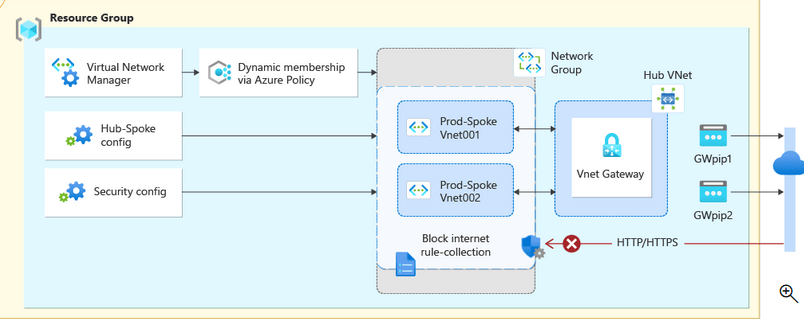
Enforced using:
- Azure Policy (deny overly permissive inbound rules)
- Azure Virtual Network Manager (global security rules)
- IaC modules that generate NSG patterns automatically
This gives freedom within boundaries.
Azure Policy + IaC Pipelines: The Only Scalable Operating Model
Infrastructure-as-Code is non-negotiable for NSG governance.
Why IaC matters
- Ensures all changes are reviewed (pull requests)
- Prevents drift
- Enables automated testing
- Gives you version history
Typical pipeline flow
- Developer/app team submits pull request
- Pipeline runs
terraform plan/bicep what-if - Azure Policy compliance is checked
- Security team approves changes
- Pipeline deploys to non-prod
- Smoke tests
- Promotion to production
- Continuous drift detection
#azure #nsg #security
 Attila Molnár