As organizations modernize their infrastructure, hybrid-cloud adoption has become the standard rather than the exception. A key architectural decision in any hybrid environment is how identities will be managed. This choice affects security, access management, automation, and scalability across on-premises and cloud workloads.
In a Microsoft-centric ecosystem, the decision typically comes down to two main identity management approaches:
👍 On-Prem Active Directory as the Primary Identity Source (with Entra Connect sync)
👍 Cloud-Only Entra ID (Azure AD) as the Primary Identity Source (Cloud IAM)
Both approaches can support strong security foundations—such as least privilege, Zero Trust, and Just-in-Time access
1. On-Prem Active Directory as the Identity Source
In this model, on-prem AD remains the authoritative directory, and Entra ID Connect syncs users and groups to the cloud. Security Groups (SGs) created in AD and synced to Entra ID.
These synced groups can be used for:
Access to cloud applications
Role-based access
Conditional access assignment
Integration with Privileged Identity Management.
How you can use this for Role Management ?:
1👉.Sync the on-prem AD group to Entra ID.
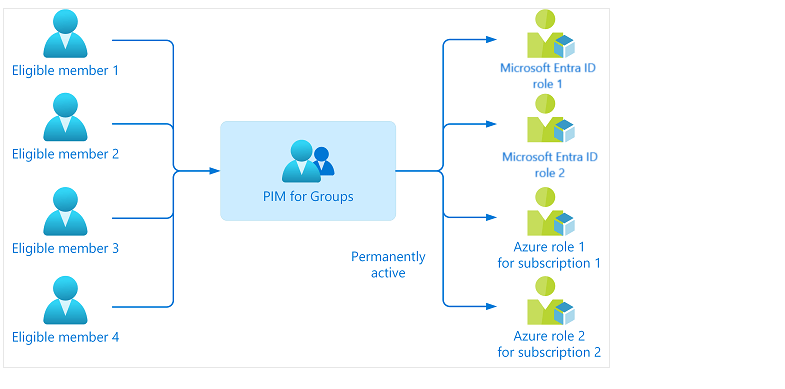
2.👉Create a cloud-only Entra ID role-based group and enable PIM.
3.👉Make the synced on-prem group an eligible member of that PIM group where you assigned Entra ID role as an active.
4.👉Use PIM approval workflow for just-in-time membership and access.
This hybrid model increases complexity but allows organizations to continue using familiar AD-based processes.
🛑 Choose on-prem AD as the identity source when:
You have significant existing AD investments
There are legacy line-of-business applications that depend on AD
You want to continue managing identities through established on-prem workflows
2. Cloud-Only Entra ID as the Identity Source (Cloud IAM)
How It Works
Here, Entra ID acts as the primary directory/IAM. All users, groups, and roles are cloud-native.
👉 1.Use Entra ID as the identity source with cloud-only users and groups.
👉 2.Enable PIM for the required Entra ID role.
👉 3.Assign users or cloud-only groups as eligible for the role.
👉 4.Use PIM approval workflow for just-in-time role activation and access.
Using Entra ID as the trust source simplifies privileged access management.
This results in cleaner governance and a standardized cloud-first security model.
🛑 Choose Entra ID as the identity source when:
You’re implementing a cloud-first or cloud-native strategy
You want simplified identity governance and reduced operational overhead
You want more flexibility in identity lifecycle automation
#PIM #Azure #Security #AD #Microsoft #Cloud #Trust #IAM #Access #Entra #EntraID
 Attila Molnár